
Myhub
The University of Maryland has partnered with the National Student Clearinghouse (NSC) to provide official enrollment certifications and degree verifications. NSC Myhub dashboard allows students to obtain these documents and their official transcripts in one convenient place. The benefits of Myhub include:
- Convenient 24/7 access
- Immediate download of enrollment certifications, degree verifications, and good student discount certificates
Students Enrolled at UMD after Fall 2000 with a Directory ID and Passphrase
- Go to NSC Myhub.
- Login with Directory ID and passphrase.
- NSC requires multi-factor authentication which will need to be completed.
- After successful login, you will be directed to the Myhub Dashboard. Select Enrollment History to view your enrollment terms at UMD.
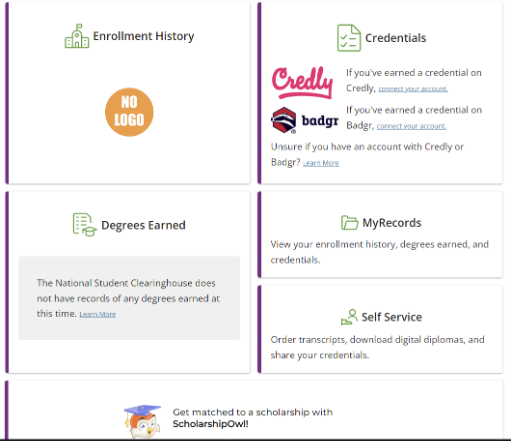
- Choose the Enrollment History tab for enrollment certifications and good student discount certificates, and the Degrees Earned tab for degree verifications.
- Expand the box by clicking on the down arrow to view and select the term (as per the term dates) for which you would like to obtain a certification/certificate/verification.
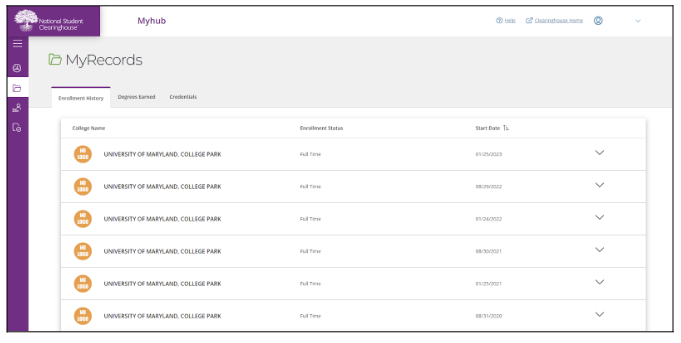
- Expand the box by clicking on the down arrow to view and select the term (as per the term dates) for which you would like to obtain a certification/certificate/verification.
- Select Download Certificate to view your options for enrollment certifications and good student discount certificates.
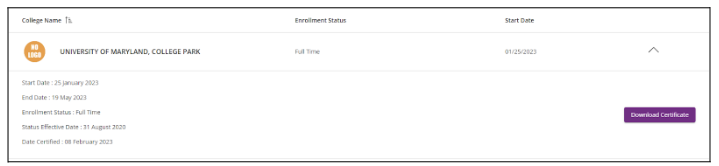
- Select the type of certification/certificate in which you are interested from the drop down box and hit Download.
- Your certification/certificate is now available as a PDF. You can view, save, and send it to the recipient of your choice.
- Please take note that you can also order your official University of Maryland transcript from this page. To do so, click the Order Transcript button right next to the Download box. This will take you to the NSC transcript ordering site.
Candidate Clearance Online
Candidate Clearance Online is used to clear undergraduate students for the degree or certificate.
Information on requesting access to this system can be found on the Systems Access page
Candidate Clearance Online is available at candidate-clearance.umd.edu.
Active Military Duty
Paying for Your Education
Active Military Duty may use VA Education Benefits and/or Tuition Assistance to pay for tuition and fees.
- For information on the VA enrollment certification process at UMD, see Using VA Benefits.
- To use Tuition Assistance, have the course/s approved through the appropriate military tuition assistance program (e.g., GoArmyEd for Army service members). Once the necessary military command signatures and dollar amount for Tuition Assistance have been obtained, take the TA Approval Letter/Statement directly to Student Financial Services and Cashiering - Third Party Billing.
Residency Classification
For information regarding residency reclassification and military exemptions, please go to Residency Reclassification Services.
Military Call-up
It is the intent of the University of Maryland, College Park, to facilitate the withdrawal or change in registration and the reenrollment of students who are called to active duty in the U.S. armed forces. The university policy governing military call-ups ( policy V-7.00) allows for a variety of unique solutions not covered by standard academic policies (such as receiving Incompletes in some classes while retro-withdrawing from others leading to a partial refund; or receiving a total refund of tuition and fees) which minimize the effects of time and financial investment put into a semester in-progress once called to active military service.
Steps for Students Called to Active Military Service
- Students (or their representative) will need a copy of the military orders.
- Students should meet with their college's advising office. Based on the specific course(s) in which the student is enrolled and the point in the semester when the call-up occurs, students may be advised to discuss Incomplete Contracts with individual instructors, or to process a withdrawal with the Office of the University Registrar, Room 1113 C. Mitchell Building.
- The Office of the University Registrar will make determinations as to appropriate withdrawal procedures and refunds and explain the process for reenrollment after completing active duty. They will also assist with quick referrals related to financial aid issues, cancellation of any campus housing contracts, and allowable refunds.
Withdrawal for active military service will have no effect on any subsequent request to withdraw from the university. Students may reenroll upon completion of their tour of duty.
Student Privacy (FERPA)
The Family Educational Rights and Privacy Act (FERPA) is a federal law that protects a student’s privacy interest in their education records. FERPA provides that educational institutions, such as postsecondary institutions, may disclose education records, or personally identifiable information from such records, only if an eligible student has provided prior written consent, except in several specified circumstances policy III-6.30(A).
The University of Maryland adheres to the policy of compliance with the Family Educational Rights and Privacy Act (FERPA):
- To permit students to inspect their educational records.
- To limit disclosure to others of personally identifiable information from an education record without the student's prior written consent.
- To provide students the opportunity to seek correction of their educational records where appropriate.
- Prior consent will not be required for disclosure of an educational record to school officials of the University of Maryland who have been determined to have legitimate educational interests.
- Certain information has been designated "Directory Information" and will be disclosed without prior consent unless a student files written notice. Directory information includes, but is not limited to: name, address, telephone, email, date and place of birth, major field of study, full-time/part-time status, participation in officially recognized activities and sports, weight and height of members of athletic teams, dates of attendance, degrees and awards received, most recent previous educational agency or institution attended.
Students who wish to limit the disclosure of Directory Information or wish access to their official records should obtain the appropriate form, fill it out, and return it to the Office of the University Registrar Front Counter Services, Clarence M. Mitchell, Jr. Building, first floor. Students alleging university noncompliance with the Family Educational Rights and Privacy Act may file a complaint with the Student Privacy Policy Office.
Faculty/Staff/Student Employees
Faculty, staff and student employees must complete UMD's FERPA tutorial prior to being granted access to UMD's student systems.
Change of Personal Information
Students can use My Profile in Testudo to update address, phone numbers, emergency contact information, and gender marker since supporting documentation is not required. To learn more about changing your gender marker, refer to Gender Marker FAQs.
To update other personal information, submit the appropriate form and documentation to the Office of the University Registrar. Each type of change request requires supporting documentation, one of which must include a photograph of the student (driver's license, UMD ID card, or passport). Submitting any change request form without the required supporting documentation will result in processing delays.
Students can also process these changes in-person by visiting the Office of the University Registrar Front Counter on the First Floor of the Clarence M. Mitchell, Jr. Building. The forms will be available for you to fill out, but make sure to bring paper copies of the official documents.
| Pictures of documents on a device will not be accepted. |
On this page:
Name Change or Correction
Requests for name changes must be submitted to the Office of the University Registrar.
At UMD, your "primary name" and "legal name" are different.
- Your primary name is the name by which you are generally known. It appears on university identification cards, class rosters, student directory and various student campus systems.
- Your legal name appears on government-issued identity documents such as a passport. At UMD, your legal name must appear on official transcripts, financial aid documents, payroll documents, and other places where a legal name is required by law or university policy.
Unless you specify otherwise, your default primary name is your legal name.
If your primary name and legal name are the same and need to be changed or corrected:
- Complete the Name/DOB Change Request .
- Provide two types of supporting documents with the correct name, one of which must contain a photograph:
- Driver’s license
- Passport
- Court-issued document
- Birth certificate
- Marriage certificate
- Submit request and supporting documentation through our Secure File Upload.
If your primary name and legal name are not the same and need to be changed or corrected:
- Complete the Primary Name Change Request .
- Provide two types of supporting documents with your legal name, one of which must contain a photograph:
- Driver’s license
- Passport
- Court-issued document
- Birth certificate
- Submit request and supporting documentation through our Secure File Upload.
Date of Birth Correction
Requests to correct your date of birth should be submitted to the Office of the University Registrar.
- Complete the Name Change/DOB correction Request .
- Provide supporting documents with the correct date of birth, one of which must contain a photograph:
- Driver’s license
- Passport
- Birth certificate
- Submit request and supporting documentation through our Secure File Upload.
Social Security Number Correction
Requests for social security number (SSN) changes must be submitted to the Office of the University Registrar.
- Complete the Social Security Number Change Request .
- Provide a copy of your Social Security card and a government-issued document with photograph.
- Submit request and supporting documents through our Secure File Upload.
Secure File Upload
Use this tool to securely upload your documentation for change of personal information requests to the Office of the University Registrar.
Box is a secure, cloud-based storage and collaboration service supported by the Division of Information Technology. View the UMD Box article for additional information.
FERPA & Confidentiality
The University of Maryland adheres to the policy of compliance with the Family Educational Rights and Privacy Act (FERPA).
Parent/Guardian Access
Students may grant limited parent/guardian access to their record.
Mid-Term Grades
To support a student's transition to the University of Maryland, instructors are required to submit mid-term grades for undergraduate students per policy III-6.00(B). These grades are an important component of student success, as they provide timely feedback to students about the university’s academic expectations. Mid-term grades are not recorded on the student’s academic transcript.
Mid-Term Grades are used:
- To inform students of their performance in the course at the midway point of the semester.
- By academic advisors to intervene with students who may need additional assistance.
Visit How to View Grades and GPAs for information on how to view your mid-term grades.
No Grade Reported
Instructors are expected to submit grades 48 hours after the final exam has been completed. Once the instructor has submitted the grades, students can view them in Testudo the next day.
An “NG” (No Grade) on your transcript or “NGR” (No Grade Reported) on the Grades application in Testudo will display until your instructor submits your final grade. If your grade has not been reported for a course after GPAs have calculated for a term, you should contact the instructor to determine why a grade has not been submitted.
Pass-Fail Grading
Pass-Fail grading method is an option for undergraduate students to select in courses that will be used as elective or are not degree requirements. Students should discuss this option with their academic advisor. Instructors will not know a student’s grading method in a course and are expected to grade students the same across all grading methods. However, when the instructor submits the final grade, it will reflect on the student’s academic record per policy III-6.20(A).
Only students who meet the Pass-Fail regulations are allowed to select this grading method.
- To register for a course under the pass-fail option, an undergraduate must have completed 30 or more credit hours of college credit with a GPA of at least 2.0. At least 15 of these credit hours must have been completed at the University of Maryland, College Park with a University of Maryland GPA of at least 2.0.
- Courses for which this option applies must be electives in the student's program. The courses may not be college, major, field of concentration, or general education program requirements.
- Only one course per semester may be registered for under the pass-fail option.
- No more than 12 semester hours of credit may be taken under the pass-fail option during a student's college career.
- Students may not choose this option when re-registering for a course.
- When registering under the pass-fail option, a course that is passed will count as hours in the student's record but will not be computed in the grade point average. A course that is failed will appear on the student's record and will be computed both in the overall average and the semester average.
- Students registering for a course under the pass-fail option are required to complete all regular course requirements. Their work will be evaluated by the instructor by the normal procedure for letter grades. The instructor will submit a letter grade. The grades A+, A, A-, B+, B, B-, C+, C, or C- will automatically be converted by the Office of the University Registrar to the mark of P on the student's permanent record. The grades D+, D, D-, and F will remain as given. The choice of grading option may be changed only during the schedule adjustment period for courses in which the student is currently registered.
See Grading Method for more information.
Incomplete Grades
On this page:
Undergraduate Students
The mark of "I" is an exceptional mark that is an instructor option. It is given only to a student whose work in a course has been qualitatively satisfactory, when, because of illness or other circumstances beyond the student's control, they have been unable to complete some small portion of the work of the course. In no case will the mark "I" be recorded for a student who has not completed the major portion of the work of the course policy III-6.20(A).
How to Request an Incomplete
- Students who think they meet the requirements for an Incomplete in a course should contact the instructor to discuss the option.
- If the instructor agrees, the instructor will download and complete the Incomplete Contract.
- Students should review the terms of the Incomplete Contract and sign-off.
- When the instructor is submitting grades for the course, the instructor will submit an “I” to be posted on the student record until the expiration date of the Incomplete Contract.
How to Remove an Incomplete
- The student is responsible for contacting the instructor to request arrangements for the completion of the work.
- The student is responsible for completing the assigned work by the expiration date on the Incomplete Contract.
- Once the Incomplete Contract expires, the instructor will either submit an updated grade to be posted to the academic record or the default grade will automatically post to the academic record.
- The student’s academic record, credits and GPA will be automatically updated to include the grade once posted.
Additional information on Incompletes can be found in the Academic Catalog.
Graduate Students
An Incomplete "I" is a mark that an instructor may award to a student whose work in a course has been qualitatively satisfactory, but who is unable to complete some portion of the work required because of illness or other circumstance beyond the student's control. This is offered entirely at the instructor’s discretion as a temporary measure for extenuating circumstances.
How to Request an Incomplete
- Students who think they meet the requirements for an Incomplete in a course (other than 799 and 899) should contact the instructor to discuss the option.
- If the instructor agrees, the instructor will download and complete the Graduate School Incomplete Contract.
- Students should review the terms of the Incomplete Contract and sign-off.
- After it is signed by the instructor and the student, the student is responsible for providing a copy of the contract to the director of graduate studies in their program.
- When the instructor is submitting grades for the course, the instructor will submit an “I” to be posted on the student record until the expiration date of the Incomplete Contract.
How to Remove an Incomplete
Students are expected to complete courses in which they received an “I” by a date no more than 12 months from the end of the term (semester or 12-week) in which the course was taken or by date of graduation.
- Students are responsible for contacting the instructor to request arrangements for the completion of the work. If the instructor is not available, the student can request this from the department chair.
- Students are responsible for completing the assigned work by the expiration date on the contract.
- Upon completion of the required work by the expiration date on the contract, the instructor will submit an updated grade to be posted. If the instructor is unavailable, the department chair, upon request by the student, will make appropriate arrangements for the student to complete the course requirements.
- It is the responsibility of the instructor or department chair to submit the grade promptly upon completion of the conditions of the Incomplete Contract. The student’s academic record, credits and GPA will be automatically updated to include the grade once posted.
- Once the Incomplete Contract expires, the default grade will automatically be posted to the academic record.
Additional information on Incomplete Grades can be found in the Academic Catalog.