
Graduate Degree Requirements
Graduate Degree Clearance Services in the Office of the University Registrar is responsible for assessing the graduation requirements and approving graduate students for master's degrees, doctoral degrees, and graduate certificates. These processes comply with policies and deadlines established by The Graduate School. To be cleared for graduation, students must meet all requirements and deadlines.
Degree & Certificate Completion Processes
Listed below are the basic outlines for the university's completion processes for master's degrees, doctoral degrees, and graduate certificates. The information is a summary of the essential progress of the latter-stages of most graduate program completion experiences at the university. Graduate programs may have requirements beyond those listed here. Please check with your academic advisor and departmental Graduate Studies Office for specific program requirements.
- Completion of required coursework
- Submission of Application for Graduation
- Submission of Approved Program Form
- Please verify the timeline and submission procedure for this form with your department
- Completion of departmental examination requirements
- Completion of thesis/departmental writing requirement:
- Thesis Student
- Register for at least 1 credit at semester of graduation
- Submission of Nomination of Thesis or Dissertation
- The nomination of the thesis/dissertation committee should be submitted at least six weeks before the date of the expected defense examination. Some departments require that the thesis/dissertation examining committee be nominated prior to the beginning of the thesis/dissertation. Please check with your department.
- Before submitting this form, please verify with your department that all members of the committee are active and can serve on the committee.
- Thesis oral examination defense
- Submission of signed Report of Thesis Examination Committee form
- Please verify the timeline and submission procedure for this form with your department
- Submission of thesis electronically via ProQuest Learning Services
- A processing and archiving fee will be charged to your student account.
- Evaluation and approval of submitted thesis
- Your department will submit your completed uAchieve audit showing program completion and completed Approved Program Form
- Graduation
- Non-Thesis Student
- Register for at least 1 credit at semester of graduation
- Your department will submit your completed uAchieve audit showing program completion and completed Approved Program Form
- Graduation
- Thesis Student
The Master Degree Completion and Graduation Checklist can be downloaded to serve as a guide to your degree completion.
Also completing a graduate certificate? Master's degree candidates seeking to be awarded a graduate certificate should submit the Graduate Certificate Completion form.
- Completion of required coursework
- Completion of departmental examinations and requirements
- Completion of departmental qualifying examinations
- Submission of Application for Admission to Candidacy
- Beginning - Completion of dissertation
- Submission of Application for Graduation
- Submission of Nomination of Dissertation Committee
- The nomination of the thesis/dissertation committee should be submitted at least six weeks before the date of the expected defense examination. Some departments require that the thesis/dissertation examining committee be nominated prior to the beginning of the thesis/dissertation. Please check with your department.
- Before submitting this form, please verify with your department that all members of the committee are active and can serve on the committee.
- Dissertation Oral examination defense
- Submission of signed Report of Dissertation Examination form
- Submission of dissertation electronically via ProQuest Learning Services
- A processing and archiving fee will be charged to your student account.
- Evaluation and approval of submitted dissertation
- Graduation
The Doctoral Degree Completion and Graduation Checklist can be downloaded to serve as a guide to your degree completion.
Doctor of Audiology graduates should submit the Certification of Doctor of Audiology Degree form to the Office of the University Registrar.
- Completion of required coursework
- Submission of Application for Graduation
- If you submitted an application for graduation for your master's degree and are also completing a graduate certificate, please also submit the Graduate Certificate Completion form.
- Verification of coursework completion
- Graduation
Additional Petitions, Waivers, and Request
Contact Information
Graduate Degree Clearance Services
C. Mitchell Bldg, Rm 1113
registrar-graduate@umd.edu
Dianne Barrett
301-314-8226
registrar-graduate@umd.edu
Latin Honors
Latin Honors afford recognition for academic excellence achieved over the duration of a student’s entire official undergraduate coursework at the University of Maryland. Summa cum laude, magna cum laude, and cum laude are the highest Latin Honors that the university bestows for sustained excellence in scholarship. They are awarded to the top 10% of all students graduating in each College or School.
- Summa cum laude - the highest 2% of GPAs (from the specific College or School)
- Magna cum laude - the next highest 3% of GPAs (after summa cum laude)
- Cum laude - the next highest 5% of GPAs (after magna cum laude)
Latin Honors are officially annotated on the transcripts and diplomas of students who have graduated.
| Because final semester grades are processed sometime after Commencement activities, identification of Latin Honors in the university's Commencement Ceremony Program are tentative and unofficial, pending the submission and calculation of all final grades for the semester of commencement. |
Additional information on Latin Honors can be found in the Academic Catalog.
Latin Honors Cutoffs for Fall 2025, Spring 2026, and Summer 2026 Graduating Classes
| Summa | 4.000 - 4.000 |
| Magna | 3.999 - 3.951 |
| Cum Laude | 3.950 - 3.896 |
| Summa | 4.000 - 3.962 |
| Magna | 3.961 - 3.927 |
| Cum Laude | 3.926 - 3.838 |
| Summa | 4.000 - 4.000 |
| Magna | 3.999 - 3.989 |
| Cum Laude | 3.988 - 3.900 |
| Summa | 4.000 - 4.000 |
| Magna | 3.999 - 3.975 |
| Cum Laude | 3.974 - 3.900 |
| Summa | 4.000 - 3.984 |
| Magna | 3.983 - 3.948 |
| Cum Laude | 3.947 - 3.888 |
| Summa | 4.000 - 4.000 |
| Magna | 3.999 - 3.990 |
| Cum Laude | 3.989 - 3.900 |
| Summa | 4.000 - 4.000 |
| Magna | 3.999 - 3.999 |
| Cum Laude | 3.998 - 3.900 |
| Summa | 4.000 - 3.992 |
| Magna | 3.991 - 3.961 |
| Cum Laude | 3.960 - 3.893 |
| Summa | 4.000 - 4.000 |
| Magna | 3.999 - 3.973 |
| Cum Laude | 3.972 - 3.900 |
| Summa | 4.000 - 3.985 |
| Magna | 3.984 - 3.925 |
| Cum Laude | 3.924 - 3.891 |
| Summa | 4.000 - 3.992 |
| Magna | 3.991 - 3.963 |
| Cum Laude | 3.962 - 3.900 |
| Summa | 4.000 - 3.987 |
| Magna | 3.986 - 3.980 |
| Cum Laude | 3.979 - 3.900 |
| Summa | 4.000 - 4.000 |
| Magna | 3.999 - 3.764 |
| Cum Laude | 3.763 - 3.715 |
Undergraduate Degree Requirements
A minimum of 120 successfully completed course credits is required for graduation in any degree curriculum; however, individual colleges, schools, and departments may establish higher requirements for graduation. Check with your advisor for specific information.
Student Academic Success - Degree Completion
This policy guides students to completion of an undergraduate degree within a reasonable period of time.
Academic Catalog - Degree Information
Specific degree requirements are listed in the Academic Catalog under the college and/or department as appropriate.
uAchieve - Degree Audit
uAchieve produces a degree audit to help students and advisors evaluate academic progress towards degree completion.
Latin Honors
Summa cum laude, magna cum laude, and cum laude are the highest Latin Honors that the university bestows for sustained excellence in scholarship.
Application for Graduation
Students must apply for graduation no later than the end of the Schedule Adjustment Period at the beginning of the semester in which they intend to graduate.
Graduation & Diplomas
The Office of the University Registrar supports students with questions regarding the conferral of degrees and certificates as well as the issuance and certification of diplomas and certificates.
Degree Requirements
Requirements for earning a degree or certificate from the University of Maryland
Diplomas
Information on diploma mailings, electronic diplomas and certificates, and diploma remake requests
Graduation
Information on applying for graduation and attending the commencement ceremony
Notary & Apostille Credential Certification
Steps for obtaining an Apostille or notarized credential certification
Enrollment Status
The Office of the University Registrar is responsible for compliance with standards for full-time and half-time enrollment. Your financial aid, degree completion, and other university services depend on your enrollment status.
Audited courses are not included in the calculation of credits for full-time status.
On this page:
Undergraduate Students
Fall or Spring Semester
| Enrolled Credits | Enrollment Status |
|---|---|
| 12+ | Full-time |
| 9 - 11 | Three-quarter time/More than half-time |
| 6 - 10 | Half-time |
| 1 - 5 | Less than half-time |
Undergraduate Agreements for Enrollment Status
- UMEI Program: Students enrolled in UMEI 001-004 are considered full-time students. Students enrolled in UMEI 005 (semi-intensive) must register for an additional 6-8 credits, appropriate to their program, to meet the full-time requirement.
- ENCO/COOP: Students enrolled in Engineering Coop (ENCO099) and Cooperative Education (UNIV099) programs are considered full-time students.
- ADS Reduced Course Load Accommodations: Eligible students can work with Accessibility & Disability Service (ADS) to request a reduction in course load to meet full-time status.
| If a student with a scholarship or grant falls below the required 12 credit hours, the scholarship or grant may be canceled. Students receiving financial aid are strongly encouraged to contact a financial aid counselor prior to dropping below full time status. Additional information may be obtained from the Office of Student Financial Aid. |
Graduate Students
The Graduate School uses a unit system in making calculations to determine full-time or part-time student status. Please note that graduate units are different from credit hours. The number of graduate units per credit hour is calculated in the following manner:
| Courses | Units per Credit Hour |
|---|---|
| 000-399 | 2 |
| 400-499 | 4 |
| 500-599 | 5 |
| 600-897 | 6 |
| 799 (Masters Research) | 12 |
| 898 (Pre-candidacy Doctoral Research) | 18 |
| EDSP829, EDUC829, HESP829 | 18 |
| 899 (Doctoral Dissertation Research) | 18 |
Fall or Spring Semester
| Enrolled Units | Enrollment Status |
|---|---|
| 48+ | Full-time |
| 25 - 47 | Three-quarter time/More than half-time |
| 24 | Half-time |
| 1 - 23 | Less than half-time |
Graduate assistants holding regular appointments have full-time status if they are registered for at least 24 units in addition to the assistantship; holders of half-time assistantships are considered full-time if registered for 36 units. Courses taken with the grading method of Audit do not generate graduate units and will not be used in calculating full-time or part-time status.
Fall, Winter, Spring, or Summer 12-week Term
| Enrolled Units | Enrollment Status |
|---|---|
| 36+ | Full-time |
| 19 - 35 | Three-quarter time/More than half-time |
| 18 | Half-time |
| 1 - 17 | Less than half-time |
Graduate assistants holding regular appointments have full-time status if they are registered for at least 18 units in addition to the assistantship; holders of half-time assistantships are considered full-time if registered for 27 units. Courses taken with the grading method of Audit do not generate graduate units and will not be used in calculating full-time or part-time status.
International Students
International students on F-1 and J-1 student visas must maintain full-time status throughout each semester according to federal regulations governing F-1 and J-1 students. Please contact an advisor in International Student and Scholar Services at 301-314-7740 if you have any questions concerning full-time status.
- Undergraduate international students must be enrolled in at least 12 credit hours each fall and spring semester to be considered a full-time student.
- Graduate international students must be enrolled in at least 48 units each fall and spring semester to be considered a full-time student (Note: 20-hour assistantships are equivalent to 24 units; 10-hour assistantships are equivalent to 12 units)
- Courses taken for "audit" or "incomplete" do not generate credits/units and cannot be used in calculating full-time status.
- Only one online course/distance education can count towards full-time enrollment.
- If you will be part-time in a semester due to illness, academic difficulties, or because you are in your final semester, you must receive permission for part-time enrollment from International Student and Scholar Services before the end of the drop/add period for that semester. To request permission, log in to iTerp and go to F-1 Student Services to complete the Part-Time Authorization e-form. Your academic advisor will need to confirm your part-time status.
Final Exams
Standard & Common Final Exam Schedules
Most courses follow a standard or common final exam schedule. Standard final exams are based on when the course is scheduled to meet. Common final exams are course specific, and the final exam for all sections of a course are given at the same day and time.
- Example for Standard Final Exams
- Courses meet MWF/MW/M/W/F from 8 - 8:45 a.m. → final exam is Saturday, May 13, 10:30 a.m. - 12:30 p.m.
- Example for Common Final Exams
- All sections of BMGT220 → final exam is Saturday, May 13, 4 - 6 p.m.
Review final exam guidelines in the Academic Catalog.
Final Exams for Classes at 6 p.m. and Later
Exams for classes beginning at 6 p.m. and later are given on the same day and at the same time that the class normally meets during the semester. For example, a class that meets Tuesday at 6 p.m. will have its exam on Tuesday of the exam week at 6 p.m.; a class that meets Thursday at 6 p.m. will have its exam on Thursday of the exam week at 6 p.m. Final examinations for classes that meet more than once a week will be held on the exam day corresponding to the first day of the week that the class meets; for example, a class that meets T/Th at 6 p.m. will have its exam on Tuesday of the exam week at 6 p.m. Exams will generally be given in regularly scheduled classrooms. The department will notify faculty of any exceptions.
4+ Examinations on a Single Day
Students may seek to reschedule final examinations so that they have no more than three examinations on any given day. It is the responsibility of the student to initiate the rescheduling or be responsible for taking the examination as originally scheduled. When rescheduling is desired, students should first contact their instructors. Students who encounter difficulty rescheduling examinations with their instructors are advised to contact the dean's office of their academic program for help. Faculty members are expected to accommodate students with legitimate rescheduling requests.
Seat Management Plan
The seat management plan is designed to reserve a portion of seats in general education and a few selected other courses for students with fewer than 60 credits and incoming new students. The seat management plan is only used in the fall and spring semesters. These courses are identified in the Schedule of Classes with a red asterisk next to the section.
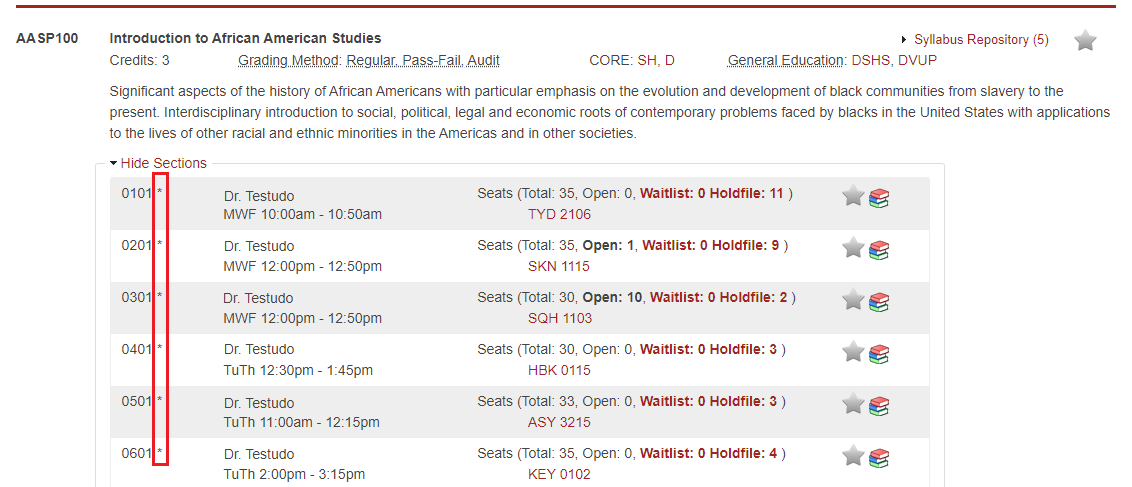
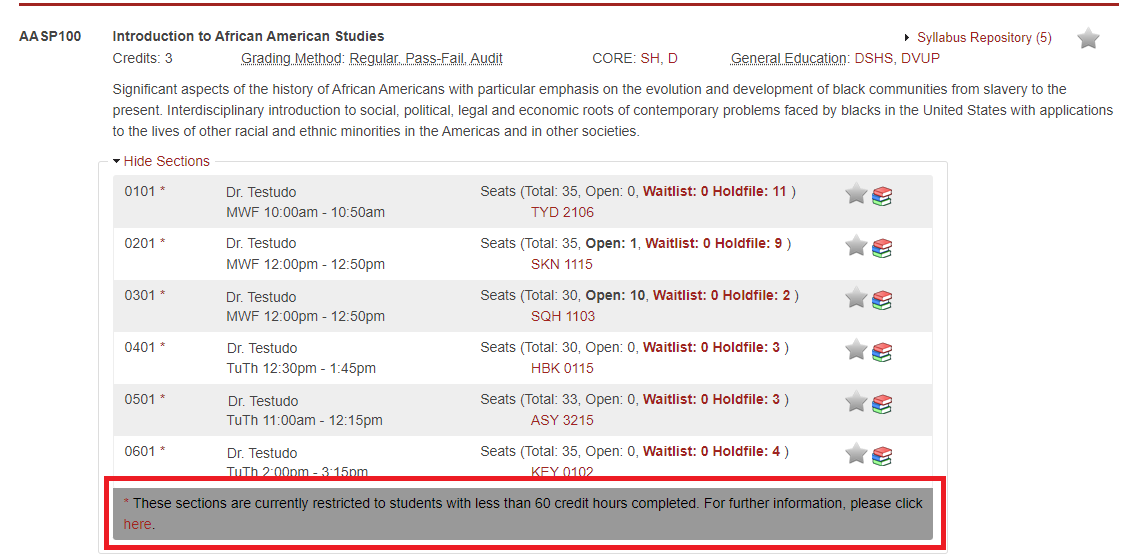
Courses on the seat management plan will have the open seats and restrictions updated throughout the early registration period and new student orientation. Students who are adding and dropping courses should review the Schedule of Classes to be aware of the current restriction on a course, which is available in the gray box at the end of the section listing.
When using Registration (Drop/Add), students are notified before they drop a course if that course is on the seat management plan along with the current restriction on that course. Students who are changing sections, should review the FAQ below before processing any changes.
Seat Management Plan FAQs
You will have to drop the course and re-add the course with a different section number. When you select to drop the course, you will be shown a message about the current restriction on the course and required to confirm “Are you sure you want to drop?” As you make a decision, consider the following:
- If there is no restriction and seats are available, you will be able to re-add the course.
- If you meet the restriction and seats are available, you will be able to re-add the course.
- If you meet the restriction and seats are not available, you will be able to go on the hold file.
- If you do not meet the restriction and seats are available, you will not be able to re-add the course and instead will have to select to go on the hold file.
Once you make your decision:
- Select “NO” if you want to keep the current section
- Select “YES” if you want to drop the current section
You should review the Schedule of Classes first to see if there is a restriction and seats available.
- If there is no restriction and seats are available, you will be able to add the course.
- If you meet the restriction and seats are available, you will be able to add the course.
- If you meet the restriction and seats are not available, you will be able to go on the hold file.
- If you do not meet the restriction and seats are available, you will not be able to add the course and instead will have to select to go on the hold file.
Only a small number of general education courses are restricted. Go to the Schedule of Classes and select the "General Education Courses" tab. Choose the category and term you would like to review and then "Show All Sections" to scan for courses that do not have a red asterisk.
Your Academic Advising College has the authority to examine your situation and make an exception if appropriate. Contact your Academic Advising College for further information.
If you do not meet the restrictions for the course, or all available seats are filled, you may place yourself on a hold file for the course. Waitlists are not initially offered for seat managed courses. On the first day of classes, seat management restrictions will end, and those students on the hold file will be eligible for any remaining seats in this course. Those students on the hold file for whom there are not open seats will be placed on a newly created waitlist. Students on the hold file must check-in on the first day of classes, and then daily, to remain on the waitlist. For more information, please see Waitlist & Hold file.
Non-Standard Courses
Non-standard courses do not meet for the standard semester or term dates. These courses are identified in the Schedule of Classes with an explicit start and end date (see example below).
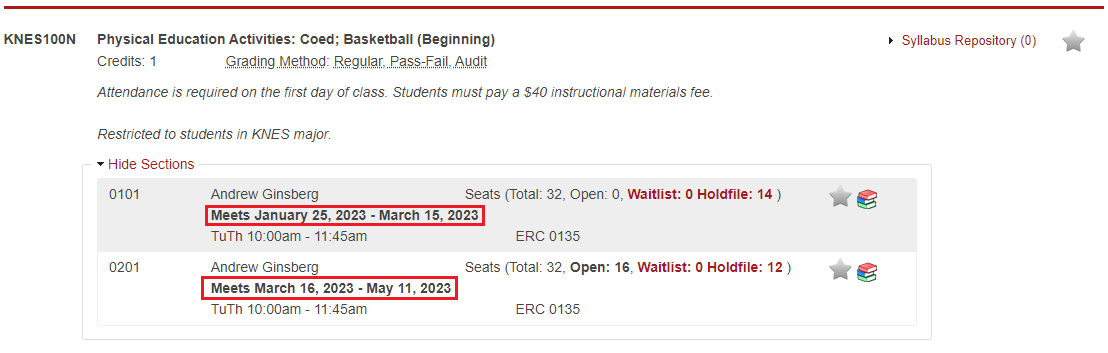
Additionally, non-standard courses have different dates than standard semesters and terms for the Schedule Adjustment Period and Drop Period (also referred to as Drop with "W"). Students are notified with an alert message while registering for a non-standard course and are responsible for being aware of the non-standard course dates and deadlines:
Grading Method
Grading method determines how a course will be reflected on the student’s permanent academic record and counted toward degree progress. Instructors do not have access to view a student’s grading method for a course and are expected to grade students without consideration for grading method.
For each course, the academic department offering the course sets the default grading method to "Regular" or "Satisfactory-Fail" and determines which grading method options are available for each term. During registration, students may change the grading method for a course to an available option based on student eligibility and registration deadlines for the term. Students should be mindful of how grading method selections can impact their enrollment status (i.e. full-time or part-time) for a particular term.
Options
- Regular: Students earn a letter grade (A - F) which will appear on the academic record and be included in a student’s GPA calculation. This option applies to undergraduate and graduate students.
- Pass-Fail: This option may be selected if available to eligible undergraduate students. Pass-Fail marks will appear on the academic record as follows:
- P is equivalent to a grade of C- or better and will not be included in a student’s GPA calculation
- A letter grade of D+, D, D- or F will be included in a student’s GPA calculation
- Satisfactory-Fail: At the graduate level, Satisfactory-Fail is used for certain types of graduate study at the discretion of the graduate program. This grading method may also be an option for some undergraduate courses. Satisfactory-Fail marks will appear on the academic record as follows:
- S will not be included in the student's GPA calculation
- F will be included in the student's GPA calculation
- Audit: This option may be selected if available. This grading method does not imply attendance or any other effort in the course. Audited courses are not included in the calculation of credits for enrollment status (full-time or part-time). Courses completed with this grading method will result in an AU on the student's academic record. Courses with a mark of AU will not be included in a student’s GPA calculation. This option applies to undergraduate and graduate students.
Other Resources: Policy III-6.20(A).
Grading Method FAQs
The grading method options available for each course can be viewed in the Schedule of Classes.
The department offering the course determines which options are available for each term. The options available are published in the Schedule of Classes.
Undergraduate students should see Pass-Fail Grading for additional information. Graduate students are not eligible for Pass-Fail grading method.
Waitlist & Hold File
If a course is full when a student registers, the waitlist/hold file option may be available. Most, but not all courses, offer a waitlist/hold file. Student names are saved to the waitlist/hold file on a first-come, first-served basis and based on the day and time a student confirms placement on the waitlist/hold file. Students will be given a seat in a section if a seat becomes available. Students must process a Waitlist Check-in to officially confirm registration for the course and section.
| Being placed on a waitlist/hold file for a course section does not guarantee that a student will receive that specific section. The waitlist manages students waiting for a day/time, not instructor or building/room. |
- Students on a waitlist/hold file must check-in daily during the mandatory waitlist check-in period posted on the dates and deadlines page. If a student does not check-in once a day during the mandatory waitlist check-in period, their name will be removed from the waitlist.
- To be eligible for the waitlist/hold file, a student cannot be registered for any other section of the desired course. A student would have to drop the registered section before placing themselves on the waitlist/hold file. A student will be removed from any waitlisted sections if registered for the same course.
- Students may place themselves on the waitlist/hold file for up to six (6) sections of a course. A student will be given a seat in the first section that becomes available and all other waitlisted sections will be removed.
- Courses received from the waitlist that conflict with a student's schedule or exceed the credit limit must be resolved immediately. Time conflicts and credit overloads cannot remain on a student's schedule without Advising College approval.
- Once a student has confirmed a course from the waitlist, it is immediately included on the student's schedule for that semester and incurs tuition charges.
- While on the waitlist or hold file, the student is responsible for the material being covered in class. If the student does not receive the course from the waitlist by the end of the mandatory waitlist check-in period, they may not continue to attend the course.
Waitlist & Hold File FAQs
The waitlist is an option if you meet the established course requirements (specific majors, credit levels, special populations, etc.)
The hold file is a roster of students who wish to register for a course, but who do not meet the course restrictions. These students must be placed on the hold file even though the course may have seats available. At the beginning of the semester, students on the hold file will be placed at the end of the waitlist. Students must then follow the established procedure for waitlist check-in.
When you attempt to register for a course (either on Testudo Registration (Drop/Add) or in-person) and the course does not have an available seat, you will have the option to place yourself on the waitlist or hold file, if one is available. You must enter a course and section to add yourself to the waitlist/hold file.
For instructions on how to add yourself to the waitlist, follow this video tutorial.
Testudo Waitlist Check-in is available as soon as you are placed on the waitlist or hold file for a course. You may access it during Testudo's operating hours.
- You are encouraged to check-in when you receive notification that you have received a seat in the course and section.
- You are required to check-in daily during the mandatory waitlist check-in period, which can be found on the dates and deadlines page.
To remain on the waitlist you must check-in once a day, either through Testudo or in-person, during the mandatory waitlist check-in period available on the dates and deadlines page. Students that do not check-in will be removed from the waitlist. If a section has already been assigned, it will be given to the next eligible student.
It is strongly recommended that you attend all sessions held for a waitlisted course if space permits. By doing so, you are able to keep up with the course material. If you are in the top five (5) positions on a waitlist, you will be given access to the course content in ELMS.
Yes, if the course appears in the waitlist section of your course ELMS space, you must still check-in during the mandatory waitlist check-in period to remain on the waitlist.
Not all departments offer waitlists for their courses. It is the decision of the department whether or not to offer a waitlist.
No, being placed on a waitlist does not guarantee that you will receive a seat. It is recommended that you complete your schedule with alternative course choices.
No, to be eligible for the waitlist/hold file you cannot be registered for any other section of the desired course. If you are currently registered for any other section of the course, you must drop that section before you can be placed on the waitlist. If you register for an open section of the same course for which you are already waitlisted, you will be removed from the waitlists.
You may select up to six (6) sections of a course. The first section to become available will automatically be assigned to you. Since you will now be registered for a section, your name will be removed from the waitlist for any additional sections of that course. If you subsequently refuse the assigned section, it will be given to the next person on the waitlist. Then you may attempt to register again and be placed on the waitlist at the end of the list.
You are encouraged to select a section that fits your schedule unless you plan to drop any course that conflicts with the waitlisted section if it is received.
If you do not drop the course that conflicts, you will be notified to resolve the issue in a timely manner or you will be administratively dropped from the course you received from the waitlist.
You must contact your advising college for an exception to policy for a time conflict or credit overload.
The system identifies the issue when students receive the course, and the issue does not update based on any action. The message can only be removed when a waitlist balance is run, generally weekly. In some cases, if students are waitlisted for other courses and checking-in daily, this message will not go away. As long as a student has taken appropriate action to resolve the issue, the student will not be dropped from the course received from the waitlist.
If new sections are opened with exact meeting times of any of your waitlisted sections, you will be automatically confirmed into the new section. You can then process a Waitlist Check-in to officially confirm your registration.
Students are required to process a Waitlist Check-in once per day during the schedule adjustment period as outlined on the dates and deadlines page. If you receive a seat on the last day of the schedule adjustment period, you can check-in the day after the schedule adjustment period to officially confirm your registration.